

A compliance coordinator at a mid-size logistics company has spent three years carefully maintaining driver certifications inside a shared Excel file. She color-codes every row, protects critical cells, and manually updates expiration dates after each training session. Then one afternoon she opens the file to find two entire tabs have been deleted. No one knows when it happened. No one knows what records are gone. And a DOT audit is scheduled for the following week.
Her situation is not unusual. Most compliance teams started exactly the same way – a spreadsheet felt like the obvious, low-friction answer when there were twenty employees to track. The problem is that most organizations never stopped. The file grew into hundreds of rows, dozens of tabs, and eventually evolved into a brittle, high-stakes system that only one or two people truly understood.
Spreadsheets were designed to calculate and organize tabular data. They were never designed to be compliance management systems. When you stretch any tool beyond its intended purpose, the gaps become your failure points.
According to research cited by Oracle, 88% of business spreadsheets contain errors. A separate analysis of decades of business research found that 94% of spreadsheets used in real decision-making contained errors serious enough to affect outcomes. In compliance tracking – where accuracy is not a preference but a legal obligation – those numbers are simply not acceptable.
The stakes extend well beyond inconvenience. Financial regulators have repeatedly cited firms for relying on manual, error-prone tracking systems that cannot reliably identify or prevent compliance failures. In 2023, a California manufacturer was cited after regulators found that its Excel-based inventory system lacked audit trails, allowed retroactive editing, and had no controls to prevent deletion of records.
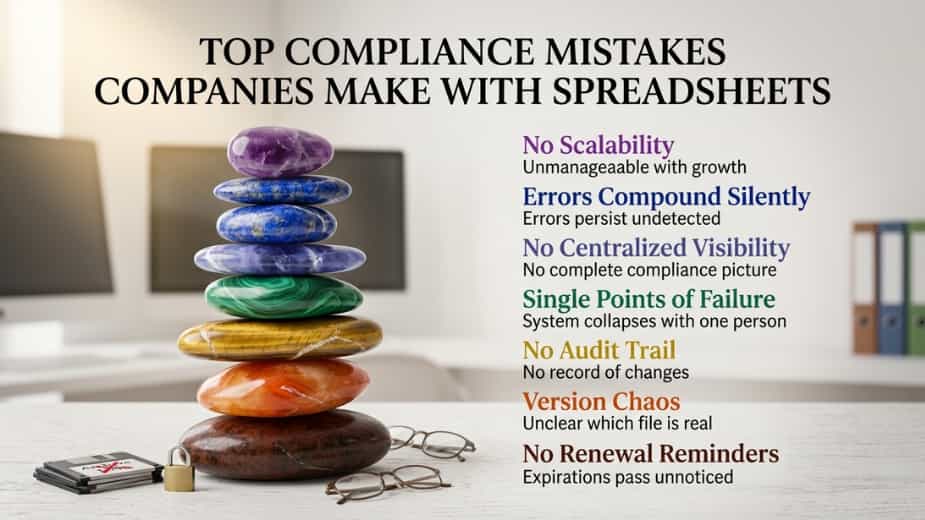
Here is a complete breakdown of the top compliance mistakes companies make by staying on spreadsheets – and exactly what a purpose-built tool like Remindax does differently.
Mistake 1: No Automatic Renewal Reminders – The Silent Compliance Killer
This is the single most costly spreadsheet compliance mistake, and it is also the most avoidable. A spreadsheet can store an expiration date perfectly well. What it cannot do is alert anyone when that date is approaching.
The date just sits there, silently, until someone manually reviews the file. Under the pressures of daily operations, that review often does not happen until it is already too late.
Think about what this looks like in practice. An employee’s forklift certification expires on March 15th. Your spreadsheet has that date accurately recorded. But if no one opens that file and specifically looks for upcoming expirations in January or February, the date passes without notice. The employee continues operating the forklift. An incident occurs. The inspector asks for certification documentation. Your records show it expired six weeks ago.
No spreadsheet in the world prevents that scenario. A system with automated renewal reminders does.
Remindax was built around this specific problem. Every expiration record you enter – whether for a driver’s license, equipment inspection, professional certification, or vendor contract – triggers an automatic reminder workflow. You choose how many days in advance to be notified, who receives the reminder, and how. There is no manual calendar monitoring required, and no risk that a date passes while your team is focused on something else.
For organizations managing hundreds or thousands of expiration records across multiple categories, the difference between spreadsheet-based tracking and automated reminders is the difference between reactive scrambling and proactive compliance.
Mistake 2: Version Chaos and the True Record Problem
Spreadsheets multiply. What starts as one clean, well-organized file becomes “Certifications_v2_FINAL.xlsx,” then “Certifications_v2_FINAL_updated_March.xlsx,” then a desktop copy that someone made because they thought it was the master file, which has since drifted from the actual master file by four months of updates.
When three different people maintain three different versions of the same compliance data, it becomes genuinely unclear which file reflects reality. And that uncertainty is not just an operational inconvenience – it is a direct compliance liability.
During an audit or regulatory inspection, you need to present the single authoritative record. If your team hesitates, searches through multiple folders, or produces conflicting files, that uncertainty undermines everything else you have done right.
Organizations that rely on Excel for compliance tracking often find themselves unable to confirm which version of a record was active at a specific point in time – which is precisely the question regulators ask most often.
Remindax eliminates this problem entirely by design. There is one record per item. Every user with appropriate access sees the same information in real time. There are no competing versions, no desktop copies, no email attachments floating around with outdated data. When an auditor asks what a certification status was on a specific date, the answer is one click away.
Mistake 3: No Audit Trail – A Regulatory Red Flag
A spreadsheet tells you what the current value is. It does not tell you when that value changed, who changed it, what it was before, or whether the change was authorized. In compliance management, that audit trail is not a nice-to-have – it is a regulatory requirement in many industries.
When a compliance officer changes a certification status from “expired” to “renewed” in a spreadsheet, there is no automatic log of when that update occurred or who made it. If the change was incorrect, there is often no way to detect it at all.
Healthcare organizations under HIPAA, financial services firms under SEC oversight, food manufacturers under FDA guidelines, and construction firms under OSHA requirements all face explicit documentation standards that demand tamper-evident, timestamped record-keeping. Standard spreadsheets do not meet that standard by any reasonable interpretation.
Remindax logs every action automatically. Every time a record is created, updated, renewed, or flagged, the system captures a timestamp and user ID. This creates a complete, defensible history for every compliance item – exactly the kind of documentation that turns an audit from a stressful investigation into a straightforward review.
Mistake 4: Single Points of Failure – The Key Person Dependency Problem
In most organizations that rely on spreadsheets for compliance tracking, one person manages the file. That person knows exactly where everything lives, understands the color-coding logic, and has memorized the rules for how rows are organized. Everyone else opens the file occasionally but does not truly own or understand it.
When that person goes on leave, changes roles, or leaves the organization, the compliance tracking system essentially walks out the door with them. Their replacement inherits a file full of unexplained conventions, hidden formulas, and no documentation of what the tracking process was supposed to accomplish.
This is so common in risk management that it has its own name: key person dependency. And in compliance contexts, it is not just a workflow disruption – it is a direct risk to your organization’s ability to demonstrate compliance during an audit.
Remindax distributes that knowledge across the platform itself. Workflows, reminders, role assignments, and record histories are all embedded in the system – not inside one person’s head. When a team member leaves, their replacement inherits a fully documented, fully operational compliance system, not a mysterious spreadsheet.
Mistake 5: No Centralized Visibility – The Fragmentation Problem
One spreadsheet rarely covers everything. In most organizations, HR maintains a spreadsheet for employee training records. The safety team maintains a different spreadsheet for equipment inspections. The legal department tracks contract renewals in yet another file. Procurement keeps vendor compliance documents in a fourth location.
None of these files communicate with each other. No one has a complete picture of the organization’s compliance status at any given moment.
A manager who needs to confirm that all employees on a specific project have current certifications has to pull three different files, cross-reference names manually, and compile an answer by hand. Every step in that process is an opportunity to introduce error. And if the manager has to repeat that exercise weekly, the risk compounds.
Remindax centralizes everything into a single compliance dashboard. Certifications, permits, licenses, equipment inspections, vendor documents, and contract renewals all live in one place. Management can view overall compliance status in real time, filter by department, category, or expiration window, and generate reports without touching a single spreadsheet.
Mistake 6: Errors That Compound Silently – The Hidden Accuracy Problem
Spreadsheet errors are famously quiet. A formula referencing the wrong cell range, a manual date entry with a typo, a row that was accidentally moved so it no longer aligns with its header column – these errors can persist for months or even years without anyone detecting them.
What makes this especially dangerous in compliance contexts is that the people reviewing the file are often looking for specific information, not searching for errors. If a certification date reads “2025” when it should read “2024,” and the person reviewing the file is simply confirming a name is present, the error goes unnoticed.
Gartner research estimates that poor data quality costs organizations an average of $12.9 million per year, much of it attributable to the kind of manual data handling that spreadsheets normalize. In compliance contexts, those costs escalate to include regulatory fines, liability exposure from undocumented incidents, and reputational damage that can affect contracts and partnerships.
Remindax reduces this risk through structured data entry, validation rules, and centralized records. Because every record type has defined fields – expiration date, responsible owner, document category – the system prevents the kind of freeform data entry that generates silent errors in spreadsheets.
Mistake 7: No Scalability – When the System Breaks Under Its Own Weight
Spreadsheets work reasonably well when you are tracking twenty employees and ten certification types. At two hundred employees and fifty certification types across three locations, they start to buckle. At five hundred employees and hundreds of active records, they become genuinely unmanageable – not because of any individual failure, but because the tool was simply never designed for that scale.
Growing organizations often fail to notice when their spreadsheet system has become untenable. The symptoms appear gradually: rows scrolling into the thousands, lookup formulas that take seconds to calculate, team members who avoid updating the file because navigating it is too confusing.
By the time the problem is obvious, months of inaccurate data have accumulated, and the effort required to migrate to a proper system has grown significantly.
The smarter approach is to move to a scalable system before the spreadsheet becomes a burden rather than after. Remindax is built to handle any volume – from a fifty-person team to a multi-location enterprise – without any change to how the system is accessed or maintained.
The Unique Compliance Risks Nobody Talks About
Beyond the seven classic mistakes, there are several compliance risks specific to spreadsheet use that most organizations never explicitly address.
No permission hierarchy. In most spreadsheet setups, anyone with access to the file has access to everything in it. A junior HR coordinator and a senior compliance officer both see the same data and have the same ability to edit or delete records. There is no mechanism to give people access to only what they need. This creates both privacy exposure and the risk of accidental or unauthorized changes. Remindax uses role-based access control, so each team member sees exactly what their role requires and nothing more.
No document attachment capability. Compliance records are not just dates – they are backed by documents. The actual certification certificate, the inspection report, the signed training acknowledgment. A spreadsheet can store the date, but the supporting document lives somewhere else. When an auditor asks to see the underlying documentation, your team has to locate files stored across email attachments, network drives, and personal folders. Remindax links documents directly to their records, so the certificate and its expiration date are always together.
No multi-user accountability. When multiple people have edit access to a shared spreadsheet, there is no way to know who made which change. This lack of individual accountability is both a governance problem and a practical one – when a record appears incorrect, there is no way to trace it back to its source or understand whether it was intentional. Every action in Remindax is tied to a specific user account, creating individual accountability without requiring complex IT infrastructure.
No mobile access with reliability. Team members working in the field – on a job site, at a client location, in a vehicle – often need to check or update compliance records away from a desktop. A shared spreadsheet opened on a mobile device creates version sync issues, display problems, and the risk of conflicting edits. Remindax provides a consistent, reliable experience regardless of device, so compliance data is always current and accurate whether it is accessed from a desk or a job site.
Signs Your Organization Has Outgrown Spreadsheets
The following are the clearest indicators that your current approach to compliance tracking has become a liability rather than an asset. If more than two of these apply to your organization, the risk of staying on spreadsheets outweighs any effort involved in moving to something better.
You have experienced a compliance finding that traced directly back to a missed expiration date. Multiple people maintain separate versions of the same compliance file. Preparing for an audit requires several days of manual record review and cleanup. One person is the sole keeper of knowledge about how your compliance tracking works. You cannot quickly answer “what is our current compliance status?” without opening multiple files and manually compiling the answer. Your employee count or certification complexity has grown significantly since you started using spreadsheets.
What a Purpose-Built System Actually Delivers
The alternative to spreadsheet-based compliance tracking does not have to be complex or expensive. The core requirements are straightforward, and platforms like Remindax deliver all of them without requiring a large IT project.
Automated reminders ensure the right people are notified before expiration dates arrive – not after. A single source of truth means every user with appropriate access sees the same, current information. A complete audit trail logs every change with a timestamp and user identity, making records defensible in any regulatory environment. Role-based access controls give team members visibility into what their role requires without the risk of accidental changes to records outside their scope. Centralized visibility gives management a real-time compliance dashboard instead of five separate files.
Remindax was designed specifically for organizations that have outgrown spreadsheets and need a reliable, scalable compliance tracking system without enterprise-level complexity. You can import your existing records, configure automated reminder workflows for every expiration category you track, and have a fully operational system within a single business day.
Making the Transition: A Practical Implementation Checklist
Audit your current spreadsheets and identify every file, every tab, and every type of compliance data being tracked. Identify who owns each file and when it was last verified for accuracy. Define the full scope of records you need to centralize – certifications, licenses, permits, contracts, inspections, and anything else with an expiration date. Evaluate compliance tracking platforms against your industry requirements and team size.
Export your current data and review it for errors before importing it anywhere new – migration is an ideal opportunity to clean up years of accumulated inconsistencies. Set up automated reminder workflows for each category of expiration date. Define roles and access levels for every team member who needs to interact with the system. Run a parallel period of 30 days where the spreadsheet remains available while you validate the new system. Retire the spreadsheet and communicate the new process clearly across all relevant staff. Schedule a 90-day review to confirm the system is being used correctly and delivering the compliance visibility you need.
Key Takeaways
Research shows 88% of business spreadsheets contain errors – a margin that is simply not acceptable in compliance-critical tracking. The most costly spreadsheet compliance mistake is the absence of automated renewal reminders, which allows expiration dates to pass silently. Version control chaos creates uncertainty about which record is authoritative – a serious liability during audits and regulatory inspections.
Spreadsheets do not maintain the kind of timestamped, tamper-evident audit trail that regulated industries require. Single-point-of-failure risk means your compliance system is only as resilient as its one primary manager. Silent data errors compound over time and are rarely detected until an incident or audit forces a detailed review.
The solution does not require a massive IT project. Remindax delivers automated reminders, a centralized dashboard, complete audit trails, role-based access, and document linking – and most organizations are fully operational within a single day of import.
Your next compliance inspection is coming whether your spreadsheet is ready or not. Automated expiration tracking with Remindax removes the uncertainty entirely – so no date passes without notice, and no auditor catches you off guard.









