

Summary Table: Quick Facts & Figures
| Component | Key Benefit | Typical Impact |
| Centralized Database | Faster access | ↓ Search time by 60–80% |
| Automated Alerts | Fewer missed renewals | ↓ Missed tasks by up to 90% |
| Compliance Monitoring | Fewer violations | ↓ non-compliance by 50–70% |
| Document Management | Easy retrieval | ↑ speed by 4× |
| Dashboards | Better insights | ↑ decision accuracy by 70–85% |
| Security Controls | Protected data | ↓ unauthorized access by 90%+ |
| System Integration | Less manual work | ↑ efficiency by 30–50% |
| Renewal Workflows | Faster renewals | ↓ processing time by 50–80% |
| Audit Trails | Clear histories | ↑ audit readiness by 90% |
| Mobile Access | Better ease of use | ↑ adoption by 60–75% |
In fields like healthcare, finance, and engineering, certifications are a must. They prove that employees have the right skills and follow the rules. But managing many certifications is hard. It’s tough to keep track of expiry dates, store documents, and stay compliant. This is why digital tools like Remindax are helpful. They make the process simple, fast, and automatic instead of manual and confusing.
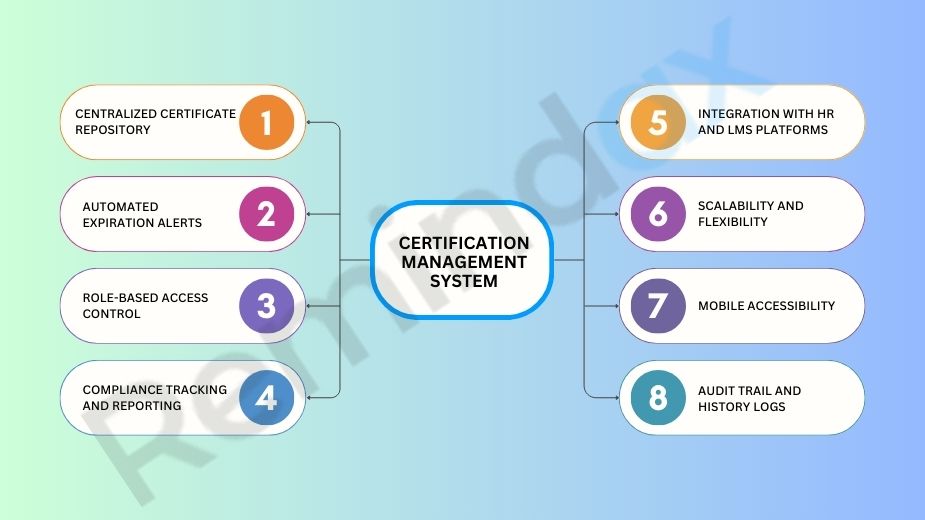
1. Centralized Certificate Repository
A good system stores all employee certificates in one secure digital place. This is called a centralized repository. It helps you find documents quickly during audits or compliance checks. You don’t need to search through paper files or different folders. Everything is in one spot. This saves time, lowers risk, and makes work easier.
2. Automated Expiration Alerts
A very important feature is automated alerts. The system sends reminders to employees and managers before a certification expires. These reminders come on time, giving people a chance to act early. This helps avoid problems with expired certifications. It keeps the company compliant with laws. It also makes sure work doesn’t stop because of missing certifications. This feature helps keep the team skilled and ready.
Read Also, How to Send Proactive Warranty Expiration Reminders
3. Role-Based Access Control
A good system must protect important data. One way to do this is by using role-based access control (RBAC). This means only certain people can see or change specific certifications. For example, a department manager can view their own team’s certifications. But an HR administrator can see all employees’ certifications. RBAC keeps data safe and stops the wrong people from making changes.
4. Compliance Tracking and Reporting
Certification management is not just about saving data. It’s about using that data in a smart way. A good system should track certifications in real time. This helps managers quickly see who is certified, who is not, and who needs to renew. The system should also give easy-to-use dashboards and reports. These reports help in reviews and audits.
Read Also, How Certification Tracking Integrates with HRMS and Payroll Systems
5. Integration with HR and LMS Platforms
A good system works well with HR and Learning Management Systems (LMS). It connects easily without any extra setup. This means you don’t need to enter the same data twice. Employee details and training records move automatically between systems. It helps avoid mistakes and saves time for HR and training teams.
6. Scalability and Flexibility
As a business grows, it needs more certifications. A good system should grow with the business. It must handle more employees and certifications easily. The system should also be flexible. It should support different departments, offices, and rules. This helps the software fit the business at every stage.
Read Also, Key Functions of a Permit Management System
7. Mobile Accessibility
Today’s workers often work from different places. Some are in the field, and some work from home. That’s why mobile access is very important. A mobile-friendly system lets employees upload documents, check their status, and get alerts on their phones or tablets. This helps remote teams stay on track and follow rules, even when they are not at a desk.
8. Audit Trail and History Logs
Transparency is very important for compliance. An audit trail and history log record every action. It shows who viewed, edited, or uploaded a document, and when. This time-stamped record proves that your team followed the rules. It is useful for internal checks and external audits. It also adds accountability and trust. Manual systems cannot offer this level of tracking.
Conclusion
A strong certification management system is a must for businesses in regulated industries. It is not just a luxury anymore. It helps keep all data in one place. It sends automatic alerts and gives useful reports. A tool like Remindax helps companies follow rules, save time, and avoid big risks. Using digital tools is the best way for businesses to stay ready. It also makes sure their staff is always trained and qualified.
Frequently Asked Questions
1. What is a certification management system?
A certification management system is software that helps organizations track, manage, and renew employee certifications. It keeps all records in one place.
2. Why is a certification management system important?
It helps avoid missed deadlines, keeps your business compliant, and reduces manual work. It also improves accuracy and saves time.
3. What are the key components of a certification management system?
The main components include:
- Centralized database
- Automated reminders
- Reporting and analytics
- Document storage
- User access control
4. How does a centralized database help?
A centralized database stores all certification data in one place. This makes it easy to find, update, and manage records.
5. What role do automated reminders play?
Automated reminders notify users before certifications expire. This helps prevent missed renewals and compliance issues.
6. Why is document storage important?
Document storage keeps certificates, licenses, and related files organized. It also makes audits easier.
7. How do reporting and analytics improve management?
They provide insights into certification status, upcoming expirations, and compliance gaps. Managers can make better decisions using this data.
8. What is user access control?
User access control allows you to decide who can view or edit information. It helps keep data secure.
9. Can a certification management system reduce manual work?
Yes, it automates tasks like tracking, reminders, and reporting. This reduces human errors and saves time.
10. Is cloud-based certification management better?
Cloud-based systems are easy to access from anywhere. They also offer better data backup and security.
11. How does the system help with compliance?
It tracks all certifications and sends alerts before they expire. This ensures your organization stays compliant with rules.
12. Who can use a certification management system?
Any organization can use it. It is helpful for healthcare, construction, IT, and many other industries.









