

When did you last check the expiration date of your website’s SSL/TLS certificate? If you can’t remember, you’re not alone. Many organizations risk downtime and security issues because they neglect this crucial task. SSL certificates are the backbone of secure online connections, but they come with an expiration date. Failing to track them can have serious consequences.
In this post, we’ll explore why monitoring SSL certificate expiration is essential, what happens if a certificate expires, and best practices for renewing them early. We’ll also highlight real-world outages caused by expired certificates and show how solutions like Remindax can make managing SSL certificates easier, especially for organizations with multiple domains and services.
What Happens When an SSL Certificate Expires?
When an SSL certificate expires, web browsers immediately flag the site as insecure. Visitors see scary warnings like “Your connection is not private” in Chrome or similar messages in other browsers. Most users will leave the site immediately.
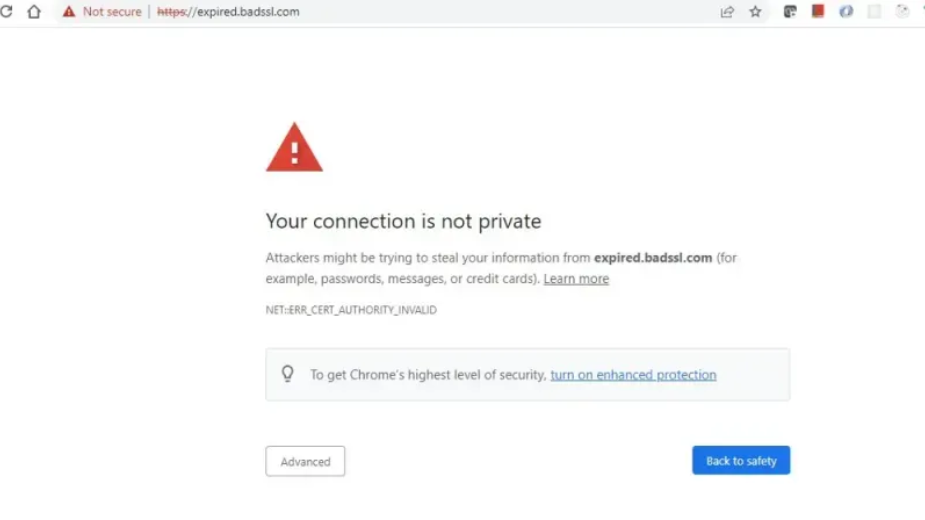
An expired certificate can have several consequences:
- Loss of website traffic: Browsers block access, which can dramatically reduce visitors.
- Broken backend services: APIs, microservices, and database connections may fail.
- Disrupted internal systems: Corporate Wi-Fi, email servers, or VPNs may stop functioning.
In short, an expired SSL certificate doesn’t just trigger a warning message-it can cause real operational downtime and business disruption.
Risks and Impacts of Expired SSL Certificates
Letting an SSL certificate expire isn’t just inconvenient; it carries serious consequences:
1. Service Outages & Downtime
Expired certificates often cause unplanned outages. Devices and apps refuse to connect to servers without valid certificates. According to an industry survey:
- 45% of enterprises experienced downtime due to certificate issues in the past year.
- 37.5% of those were explicitly due to expired certificates.
- Another report showed 88% of companies had unplanned outages caused by expired certificates in the last two years.
Certificate expiry is one of the most preventable causes of downtime, yet it still happens frequently.
2. Security and Compliance Risks
Expired certificates make your website or service untrusted. Users on such connections are vulnerable to man-in-the-middle attacks, and organizations may fail compliance audits.
For example, during the Equifax breach, failure to notice an expired certificate left critical monitoring systems blind to attacker traffic for 76 days-showing how even one overlooked cert can compromise security.
3. Loss of Customer Trust and Revenue
SSL certificates are a cornerstone of online trust. When visitors see warning signs:
- They may abandon transactions.
- They may assume your site is unsafe.
- Even short periods of “untrusted” status can cost revenue and harm reputation.
CrowdStrike notes that expired SSL certificates often cause service outages, reputational damage, and revenue loss.
4. Operational Chaos
Expired certificates trigger emergency firefighting:
- Engineers scramble to renew and deploy certificates.
- Multiple teams may be involved, causing coordination issues.
- Mistakes are more likely under pressure, potentially creating cascading failures.
This highlights why proactive renewal is crucial.
Lessons from Real-World Certificate Expiries
Even major companies have faced costly outages:
- Microsoft Teams (Feb 2020): Authentication certificate expiry caused a 3-hour outage affecting millions of users.
- Spotify (Aug 2020): An expired SSL certificate disrupted streaming and web API calls.
- Epic Games (Apr 2021): A multi-hour outage occurred due to an expired wildcard certificate used across hundreds of services.
- O2 & SoftBank Mobile Networks (Dec 2018): An expired Ericsson telecom certificate caused UK and Japan mobile network outages affecting tens of millions.
These cases prove that even large organizations can be caught off guard, making proper SSL management essential.
When Should You Renew SSL Certificates?
The safe rule: renew well before the expiration date. Experts recommend 30 days in advance as a minimum buffer. Many certificate authorities, like GoDaddy, even start reissuance 60 days before expiry for auto-renewals.
Reasons to renew early:
- Validation and issuance: OV and EV certificates may take days to verify your business identity. DV certificates are faster, but can still hit snags.
- Internal deployment: Certificates must be installed across all servers, load balancers, and services-sometimes taking hours or more.
- Unexpected issues: Errors in renewal, payment, or verification can delay issuance. Starting early ensures you have time to resolve problems.
With certificate lifespans now limited to 13 months, frequent monitoring and early renewal is essential.
How Long Does Renewal Take?
A typical SSL certificate renewal involves:
- Order/Renewal Request: Generating a CSR and submitting the renewal (minutes).
- CA Validation: DV is fast; OV/EV can take days.
- Certificate Issuance: Immediate once validated.
- Installation: From a few minutes to hours, depending on the environment.
- Verification & Propagation: Ensure all servers, apps, and users recognize the new certificate.
Even simple DV renewals benefit from a buffer period, and EV renewals especially require careful planning.
Staying Ahead: Monitoring and Automated Reminders
Manual tracking is no longer sufficient. Organizations often manage hundreds of certificates across multiple domains, servers, and services. Relying on spreadsheets or CA emails is risky.
Best practices:
- Centralize Your Inventory: Keep a full record of all SSL certificates, including internal and external systems. Automated discovery tools help maintain visibility.
- Automated Monitoring & Alerts: Use software to alert you 60, 30, or 7 days before expiry. Automation reduces the risk of missed renewals.
- Certificate Lifecycle Automation: Platforms can handle discovery, renewal, and deployment. Automation reduces human error and frees teams to focus on strategy.
- Contingency Planning: Have a playbook for emergency certificate replacement and assign responsible team members.
This is where Remindax comes in: it centralizes SSL tracking, sends automated alerts, integrates with providers like GoDaddy, and keeps your team proactive rather than reactive.
Introducing the Free SSL Certificate Checker & Remindax
To help you stay ahead:
- SSL Checker: Quickly check domain certificates, expiration dates, and chain issues. Free and easy to use.
- Remindax: Handles SSL and other expirations (domains, licenses, certifications) with automated alerts, provider integration, central dashboards, and team collaboration tools.
Key benefits:
- Automated monitoring and timely alerts
- Integration with GoDaddy, AWS, Azure, and other providers
- Central dashboard for all certificates
- Collaboration features for IT and security teams
With Remindax, you reduce risk, avoid downtime, and ensure business continuity without constant manual tracking.
Frequently Asked Questions
1. What is an SSL certificate and why is it important?
An SSL certificate is a digital certificate that encrypts data between a website and its visitors. It protects sensitive information such as passwords, credit card details, and personal data. Websites with SSL also show HTTPS in the browser, which builds trust and improves security.
2. What happens when an SSL certificate expires?
When an SSL certificate expires, browsers show a security warning to visitors. This can scare users away and damage your website’s reputation. It can also stop secure connections and affect online transactions.
3. Why is SSL certificate expiry monitoring important?
SSL certificate expiry monitoring helps website owners track certificate expiration dates and receive alerts before the certificate expires. This ensures certificates are renewed on time and prevents website downtime or security warnings.
4. How often should SSL certificates be checked?
SSL certificates should be checked regularly, especially if you manage multiple domains or subdomains. Automated monitoring tools can check certificates daily and send alerts weeks before expiration.
5. Can SSL expiration affect SEO rankings?
Yes. Search engines prefer secure websites. If your SSL certificate expires and the site becomes insecure, it can affect search rankings and reduce visitor trust, which may lower website traffic.
6. How does automated SSL monitoring help businesses?
Automated SSL monitoring tools track all certificates in one place and send reminders before expiration. This reduces manual work, prevents missed renewals, and helps businesses maintain secure and trusted websites.
7. How can SSL monitoring tools help manage multiple certificates?
SSL monitoring tools allow organizations to track certificates across many websites, domains, and servers. Tools like Remindax can send automated alerts, helping teams renew certificates on time and avoid unexpected website security issues.









